
Post selection
Spend less time sorting through posts and more time on the subjects you follow.
What it does
Select posts by topic, give priority to useful keywords, and exclude unwanted terms.
How it helps
Topic descriptions define what you are looking for. Keywords raise a post's priority, while exclusions remove unwanted material from the selection.
Example
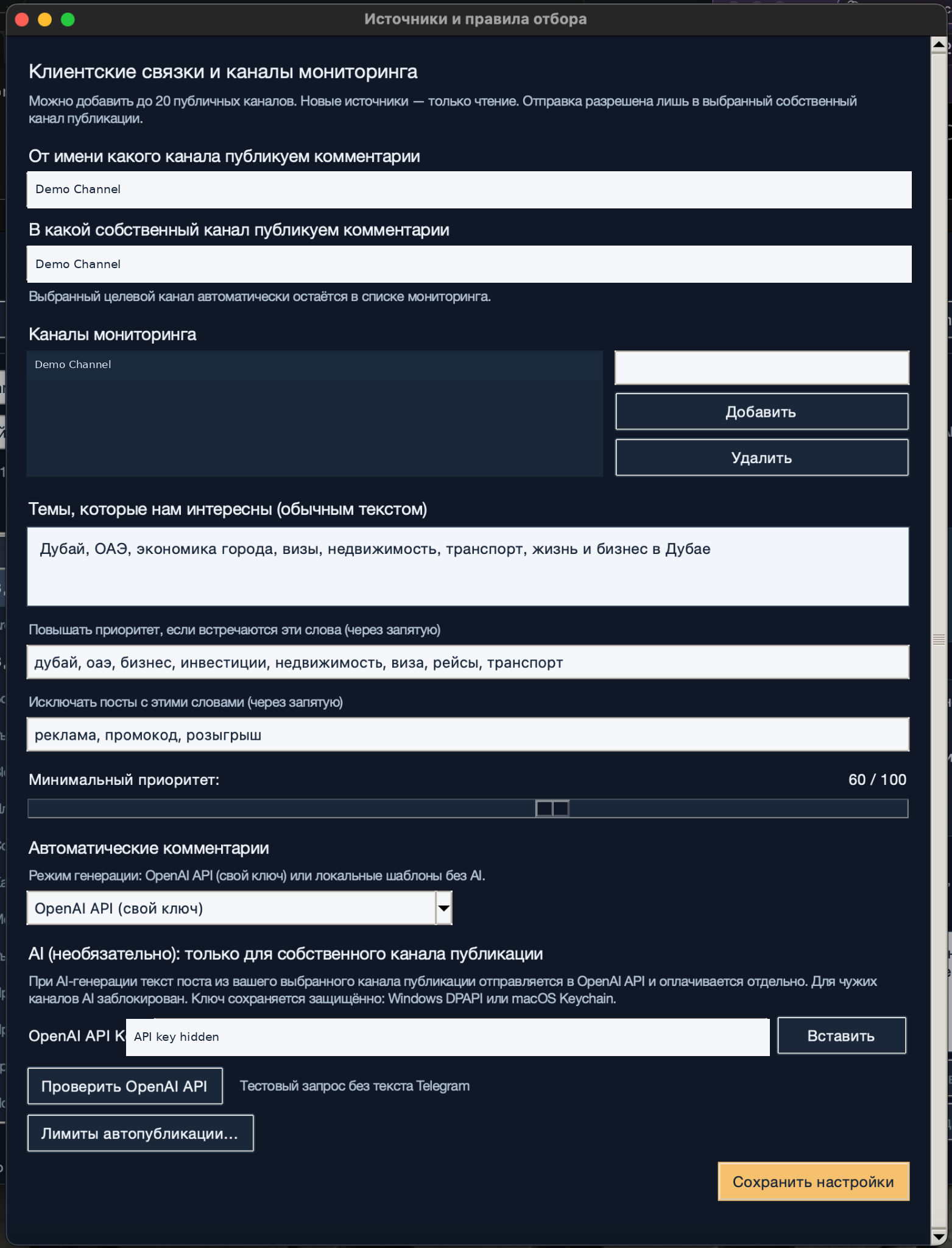
For a Dubai business roundup, describe the city's economy and transport, prioritize investment and visa news, and exclude promo codes and giveaways.
How to set it up
Step 1 of 4
Describe the topics you follow
In the source settings, fill in «Темы, которые нам интересны (обычным текстом)» (Topics we are interested in, in plain language). Describe the subjects, places, and types of news you want to follow.
Step 2 of 4
Add priority keywords
In the field for words that raise priority, enter specific terms separated by commas: for example, investment, visa, transport.
Step 3 of 4
Add exclusions
Enter unwanted terms in the exclusion field, separated by commas. Start with clear cases such as promo code or giveaway. Broad exclusions can hide useful news.
Step 4 of 4
Set the minimum priority
Adjust «Минимальный приоритет» (Minimum priority) and save the settings. Review the selected posts during monitoring. Raise the threshold if too many are irrelevant, or lower it if too few useful posts appear.
Step 1 of 4
What to expect
The app selects incoming posts using your topic rules and minimum priority.